
AI Agent Suite

An AI that can actually do things.

Most assistants answer questions. This one books the seat, moves the booking, checks the parcel and takes the payment — in the systems you already run — and knows when to put a person on it instead.

In production today for a national coach & courier operator, handling voice, web chat and WhatsApp against a live reservations platform.

How it fits

Three customer channels, one agent, your systems of record.

The agent is not a separate island of information. It reads and writes the same platform your branch staff use, so what it tells a customer is what your business actually knows — and every conversation is one record, whichever channel it arrived on.

How the AI agent suite fits together Voice, web chat and WhatsApp all reach one AI agent. The agent reads and writes your booking, payment, tracking and customer systems. A live agent console lets a person take over a conversation, and a cost dashboard meters every conversation. Voice · phone Web chat WhatsApp AI agent answers · books · changes reads & writes YOUR SYSTEMS Reservations & ticketing Payments gateway Parcels & tracking Customers & loyalty Timetables Live agent console hands over Cost dashboard meters

01 · Conversational AI Agent

It finishes the job, instead of handing over a phone number.

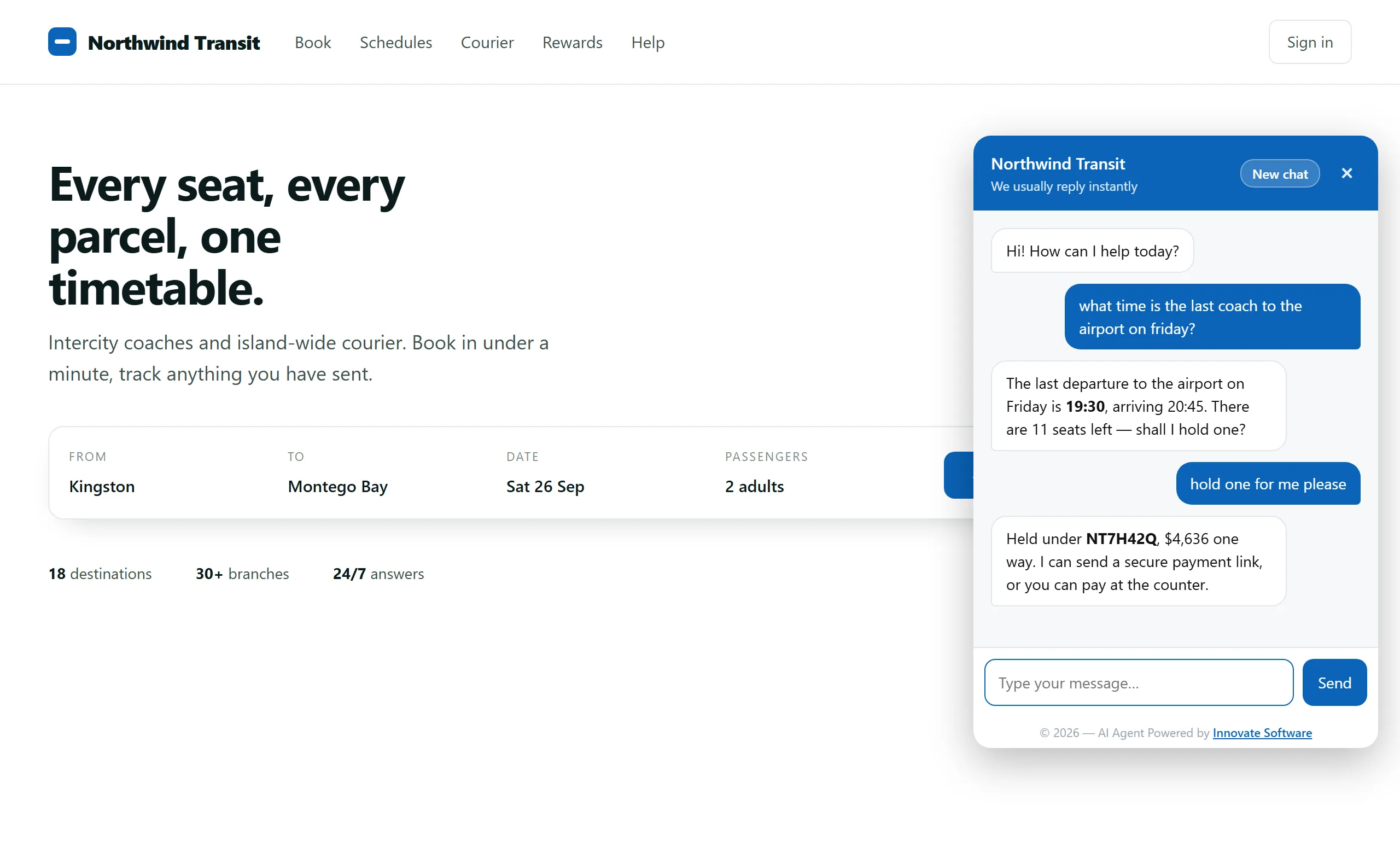
The same agent answers on the phone, in the chat widget on your website and on WhatsApp — and it is connected to your platform, so it can quote a real fare, hold a real seat, move a real booking and take a real payment. Customers get an answer in seconds at two in the morning, and your team stops re-typing the same five questions.
  • Books and changes for real. Availability, fares, seats, reschedules and cancellations against your reservations system — not a form that emails someone.
  • Takes payment. A secure link through your existing gateway, or a reservation held for the counter to collect. The customer's own words decide which.
  • Checks things up. Timetables, parcel tracking, branch details, loyalty points — read live, never from a stale copy.
  • Verifies before it reveals. Booking details are withheld until the caller proves the booking is theirs.
  • Knows its limits. When a request needs judgement or authority it does not have, it says so and fetches a person.
The chat widget open on a transport company's website. The customer asks what time the last coach to the airport is on Friday; the agent answers 19:30 arriving 20:45 with 11 seats left and offers to hold one. The customer says to hold one and the agent confirms it is held under booking NT7H42Q for $4,636, offering a secure payment link or payment at the counter.
The web chat widget, branded for the operator and dropped in with one script tag. The same agent answers on voice and WhatsApp.

02 · Live Agent Console

The handover a customer never has to notice.

When the AI reaches the edge of what it should decide, the conversation moves to a person — in the same thread, on the same screen. Your agent opens it already knowing who the customer is, what was promised, and what the booking system says right now. No transfer, no "can you repeat that", and no separate helpdesk product to buy.

  • The customer card. Name, contact, trip, fare, bags and booking codes — everything the conversation already established, curated rather than dumped.
  • Live booking status. The card says a booking exists; this asks the booking system whether it is paid, reserved or released, because that can change at a counter.
  • Saved and drafted replies. Type / for the team's canned answers, or ask for a draft and send it once you agree with it.
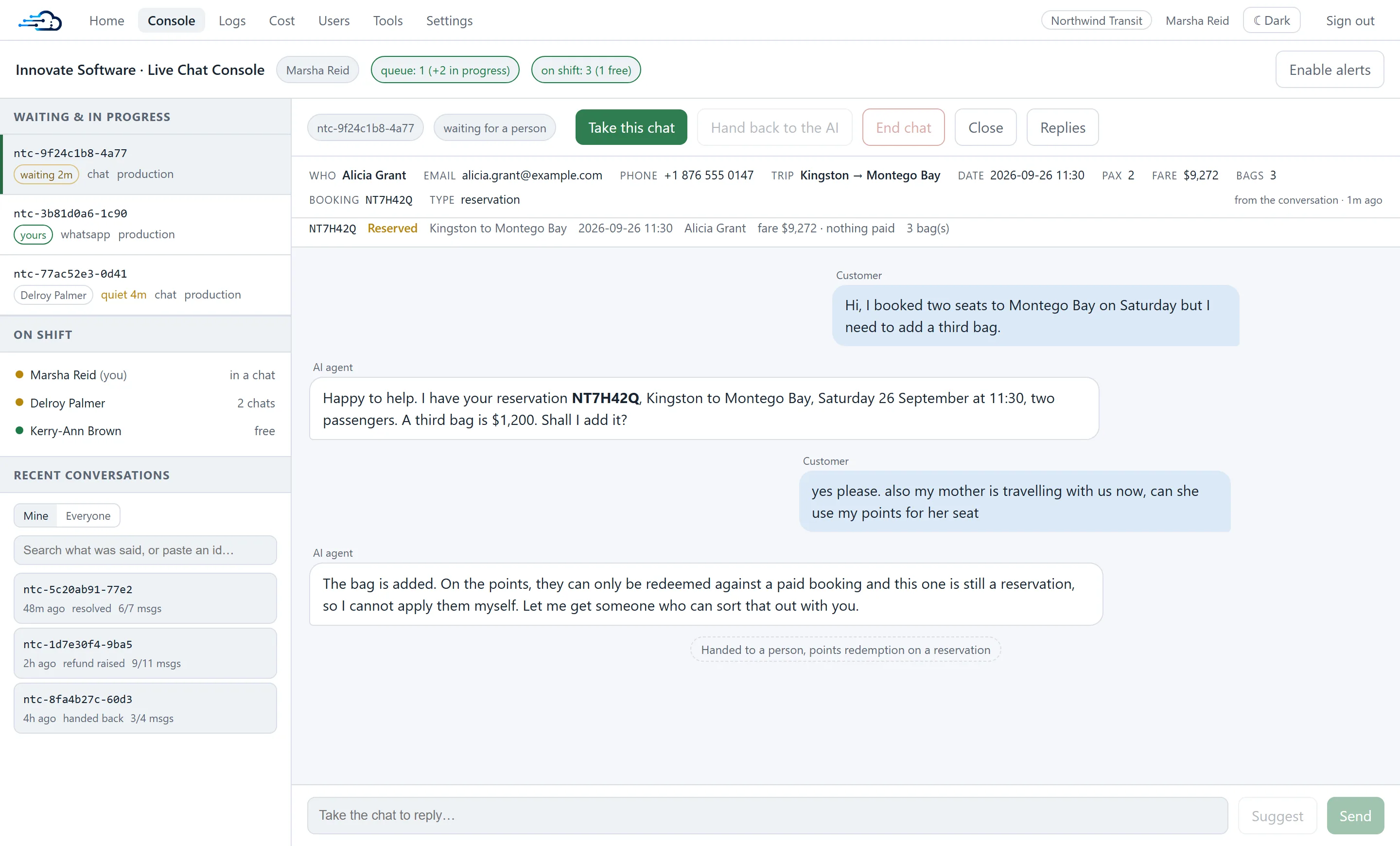
  • Who is on shift. Presence and load across the team, so a waiting customer is visible to everyone, not just whoever is looking.
  • Switchable per channel. Turn human handover on for web chat and off for WhatsApp — or off entirely — per environment.
The live chat console. A left column lists waiting and in-progress conversations, who is on shift and recent conversations. The main pane shows a customer card with name, email, phone, trip, date, passengers, fare and booking code, a live booking status row reading Reserved with nothing paid, and the transcript in which the AI adds a bag then hands over because loyalty points cannot be redeemed against a reservation.
A conversation waiting for a person: the AI's own summary of the customer on top, the booking system's current answer underneath, and the reason it handed over at the end of the thread.

03 · Cost & Usage Dashboard

AI with the meter left running where you can see it.

Conversational AI is usually sold on promises and billed in arrears across four different providers. This ships with the bill attached: what each layer cost, per day and per channel, at rates you can edit to match the contracts you actually signed — so the decision to roll it out further is an arithmetic one.
  • Metered, not guessed. Model usage is read from the actual runs; speech is measured from each call's own records, not from a pooled estimate.
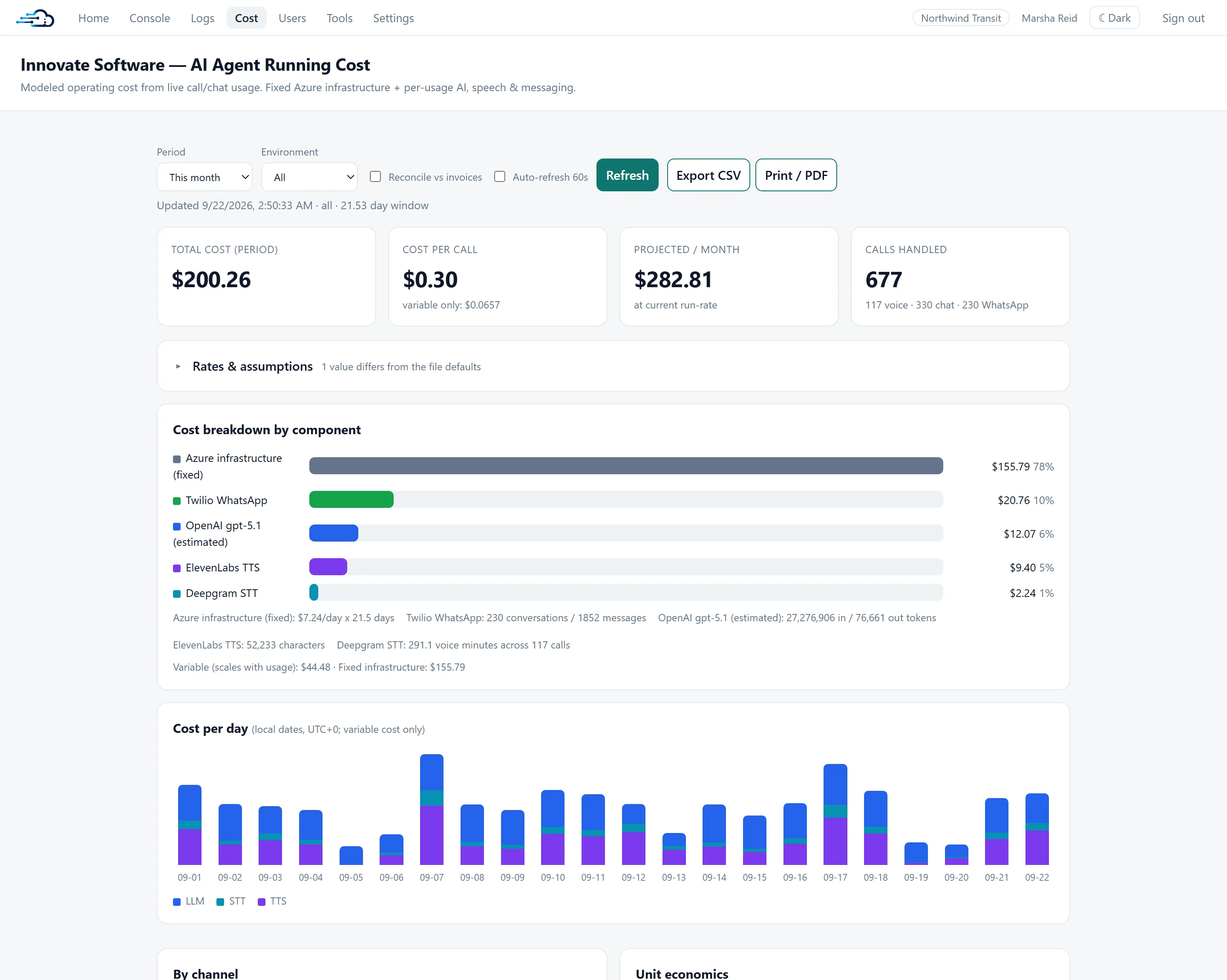
  • Split by layer. Language model, speech-to-text, text-to-speech, messaging and fixed infrastructure, each with the usage behind the number.
  • Unit economics. Cost per conversation, per voice minute and per turn, plus what the monthly bill becomes at 100, 250 or 1,000 conversations a day.
  • Your rates. Every unit price is editable on the page, and a what-if recalculates without touching the stored defaults.
  • Exportable and reconcilable. CSV and PDF for the board pack, and a check against the providers' own billing.
The running-cost dashboard. Headline tiles show total cost for the period, cost per call, projected monthly cost and calls handled, split by voice, chat and WhatsApp. Below, a cost breakdown by component ranks Azure infrastructure, Twilio WhatsApp, the language model, text-to-speech and speech-to-text with the usage behind each, followed by a stacked per-day chart across the month.
A month of conversations, priced per layer. The figures shown here are from a demonstration dataset, not a customer's account.

Where it runs

Your tenant, your data, your integrations.

This is not a seat on somebody else's multi-tenant platform. It is deployed into your Azure subscription, talks to your systems over your own credentials, and the conversation history belongs to you.

Deployed on Azure

Runs in your subscription, architected by a Microsoft Certified Azure Solutions Architect Expert. Scaling, backups and monitoring are part of the build, not a later project.

Integrated, not bolted on

We connect to the reservations, payments, tracking and customer systems you already run. If there is no API for something, that is an engineering problem we are used to solving.

Named staff accounts

Every staff surface sits behind per-person accounts with role-based permissions and an audit trail — no shared password taped to a monitor.

Your conversation history

Transcripts and logs live in your database, with retention you set, searchable and exportable. Nothing depends on us keeping a copy.

Getting there

Live on one channel first, measured before it is widened.

01

Map the conversations

We start from what your customers actually ask and what your staff actually do about it — including the requests an AI should never decide alone.

02

Connect the systems

Read access first, then the write operations, each one gated so the agent cannot commit anything the customer did not ask for.

03

Launch one channel

Usually web chat, with the console staffed behind it. Real conversations, a small audience, and the cost dashboard on from day one.

04

Widen on the numbers

Add WhatsApp and voice once the first channel's resolution rate and cost per conversation say it is worth it.

Next step

Tell us what your customers keep phoning about.

That conversation is usually enough to say whether this would pay for itself, and which channel to start on. If it would not, we will say so.